
Free MT5 Price Alert Indicator: Interactive Multi-Line Dashboard (Download)
Download our free MT5 indicator for interactive multi-line price alerts. Drop visual alert lines on your chart with 1-click, drag & drop functionality, and get instant push notifications.
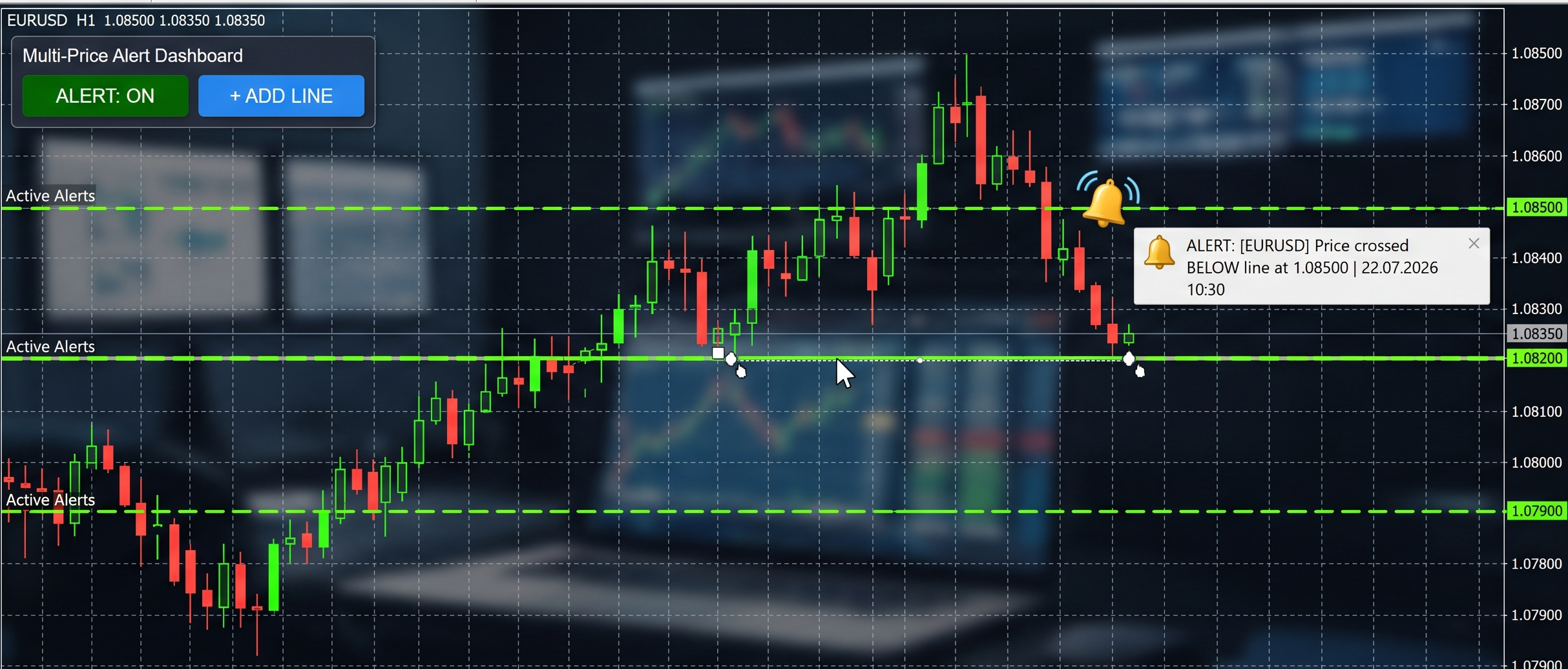
Quick Answer: What is the Multi-Price Alert Dashboard?
The Multi-Price Alert Dashboard is a free custom indicator for MetaTrader 5 (MT5). It solves the clunky default alert system by giving you a 1-click, on-chart interface to drop, drag, and manage multiple visual price alert lines. It supports pop-ups, sound, and mobile push notifications.
Setting price alerts in MetaTrader 5 (MT5) shouldn't feel like a chore. While the default MT5 alert system works, it is buried in right-click menus, lacks visual flexibility, and does not adapt well to fast-paced chart reading.
If you trade breakouts, track multiple support and resistance levels, or just want to step away from the screen without missing a key level, you need a faster solution. We built the Multi-Price Alert Dashboard to solve this exact problem. It is a lightweight, on-chart tool that lets you drop visual alert lines with a single click.
What Makes This MT5 Alert Indicator Different?
Instead of manually typing in price coordinates through hidden menus, this indicator provides a mini-dashboard directly on your trading chart, optimizing your workflow:
- 1-Click Line Generation: Click the
+ ADD LINEbutton to drop a new horizontal alert line at the current market price. You can add as many independent lines as you need. - Drag & Drop Functionality: Lines are automatically selectable. Just click and drag them to your specific trade setups, order blocks, or moving averages.
- Master Toggle Switch: A dedicated
ALERT: ON/OFFbutton lets you silence all alerts instantly. The lines change color (from bright green to gray) so you know their active status at a glance. - Smart Auto-Cleanup (Spam Protection): By default, once the price crosses an alert line, it triggers your notifications and then automatically deletes itself. This prevents your terminal from spamming you with alerts if the price bounces around that exact level.
- Flexible Notifications: Supports standard MT5 pop-up windows, custom
.wavsound files, and push notifications straight to your mobile phone.
How to Install the Indicator in MetaTrader 5
Follow these simple steps to install the indicator:
- Download the File: Click the download link below to get the compiled
Alerts.ex5indicator file. - Open Data Folder: Open your MetaTrader 5 terminal, click File in the top menu, and select Open Data Folder.
- Place the File: Navigate to
MQL5/Indicatorsand paste the downloaded.ex5file there. - Refresh Navigator: Go back to MT5, right-click anywhere in the Navigator panel (Ctrl+N), and select Refresh.
- Attach to Chart: Find the
MultiPriceAlertDashboardin your Indicators list and drag it onto your chart.
Key Indicator Settings Explained
You can customize how the indicator behaves in the Inputs tab when you attach it to your chart:
| Setting | Functionality |
|---|---|
| Delete line after it triggers? | If true, the line deletes itself after firing. If false, it stays on the chart and will alert you every time price crosses it. |
| Play Audio Sound | Toggles audible alerts. Ensure your MT5 global audio events are enabled (Ctrl+O > Events). |
| Audio File Name | The specific .wav file to play (e.g., alert.wav or timeout.wav). |
| Push Notification | If true, sends the alert to your MT5 mobile app (requires MT5 mobile setup). |
Track this in Treydly — free
Connect your MT5, MT4, or cTrader account, import your trade history, get all your statistics instantly.
Create Free Account